
Introduction
My homelab first started in 2018 when I got my first server. Since then, it has expanded with a couple more servers and some more networking hardware. Now, though, the chips in the servers are coming up to 14 years old with DDR3 RAM, and their SAS drives are showing their age. Whilst my knowledge of running servers and infrastructure has grown over the years, it hasn’t been reflected in the architecture of my homelab.
It just so happens that I am about to acquire two new servers that are less than five years old and use hardware from this decade. That gives me an opportunity to re-architect the lab, improve its reliability, and put my learning to the test. Below, I’ve outlined the key requirements for this update.
Background & Current Setup
Right now I have four machines, three Dells and one IBM, sitting in a 24U rack in my garage. They connect through an 8-port unmanaged switch, and the garage is linked back to the house using a powerline Ethernet adapter. Because the two locations share electrical circuits, the link usually manages somewhere between 15 and 60Mbps in each direction.
The four nodes run as a Proxmox cluster, but each machine only has local storage. Some have 1TB available, and one has up to 3TB usable, and they all use hardware RAID cards with at least one-drive fault tolerance. VMs are spread across the hosts in a fairly sporadic way, because the machines have different strengths in cores, clock speed, RAM, and storage.
That means high availability is only really possible if the VM disks live on shared network storage. If that storage is up, the VMs can move and restart elsewhere; if it fails, that HA layer goes with it.
There are also no backups right now, and the VMs are provisioned manually, so disaster recovery would mean rebuilding them from memory. The current setup is a mix of legacy decisions and constraints that no longer match how I want to run the lab, so it is time for an upgrade.
Requirements
- Greater infrastructure independence, running more core services like DNS, identity management, certificate authority, package mirror, and other foundational services.
- Improved resilience and failover, removing unnecessary single points of failure and adding shared storage like Ceph.
- Deterministic infrastructure deployment using IaC like Terraform and Ansible for automation.
- Introduce reliable onsite and offsite backups, any level of backups will be better than before; offsite backups will probably be with a cloud provider like Backblaze.
- Improved network uplink to the rack, replacing the powerline Ethernet adapter with a fibre optic run with a 1GbE link.
- Homogeneous hardware, with matching new servers, and as old servers are phased out, they will be replaced with matching machines. Networking gear will follow in a similar pattern.
These are the main focuses for the first phase, though there will be other changes along the way.
Architecture
Physical Layout
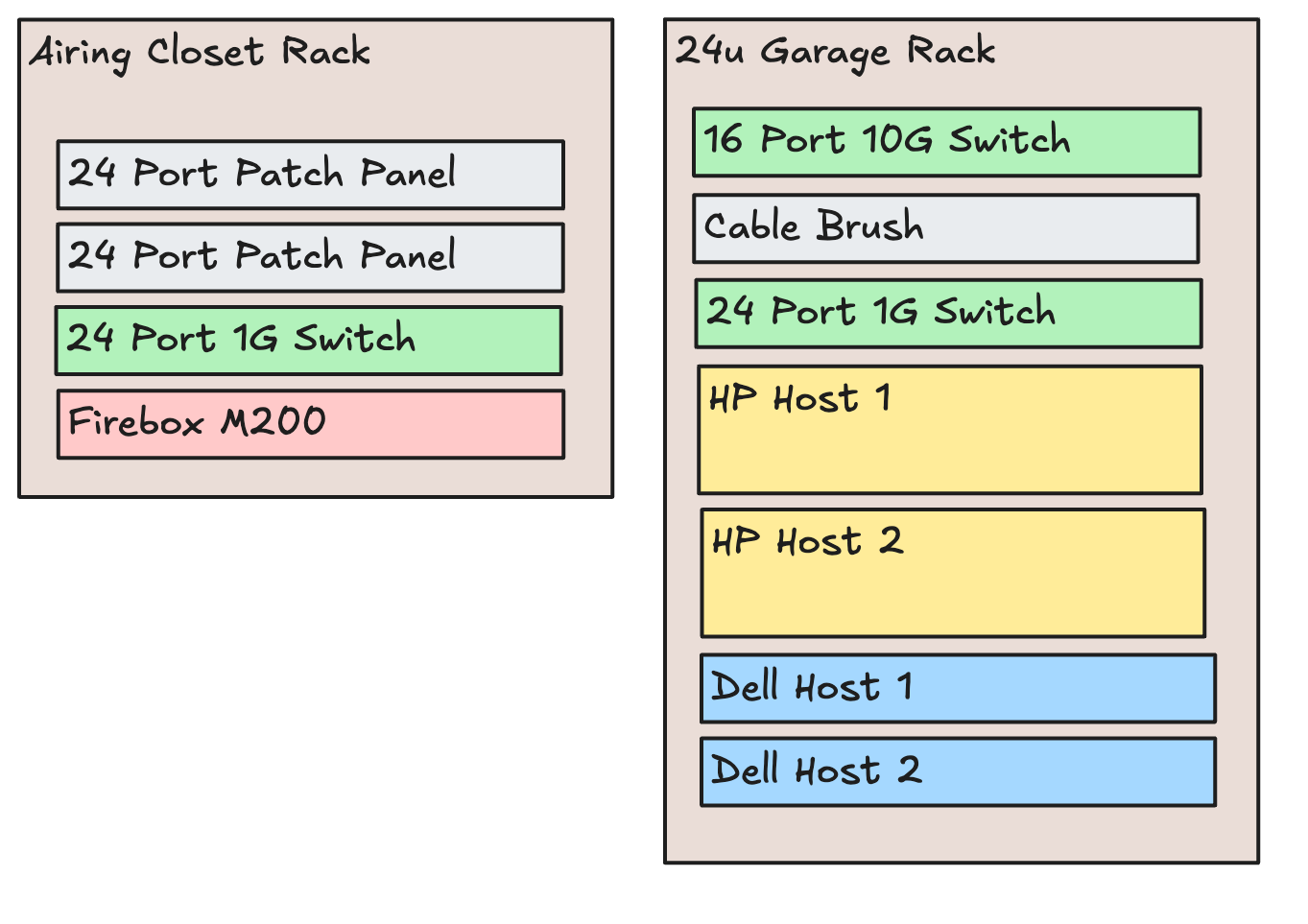
The new hardware I’m getting will consist of two HP rack servers, specifically the DL380 G10. Each of these hosts will have 96GB of RAM and two 20-core Intel Xeon Golds. Two Dell machines will be kept, but these will be upgraded and eventually retired in favour of more DL380 G10 machines.
Due to the size of the rack and the noise of the servers, it is located in the garage, so a managed switch must be put in both the airing closet and the garage. The rack in the airing closet has two 24-port patch panels; the keen-eyed among you will have noticed there is only a single 24-port switch in there though. This is because only a handful of devices in the house use wired connections, so most of those patch panel ports are not in use. The airing closet rack is where the internet comes in, which meets the Firebox M200, an enterprise firewall made by WatchGuard. This will be replaced by a dedicated OPNsense firewall at a later date, but for now it does the job and was free!
Right now the garage will only have the 24-port 1G switch, and the 10G switch will come later due to cost constraints. This may be done using 10G network cards and DAC cables to each machine, so the switch can be bought at a later date while still allowing high-bandwidth inter-machine connections for VM migration or large file transfers.
Networking
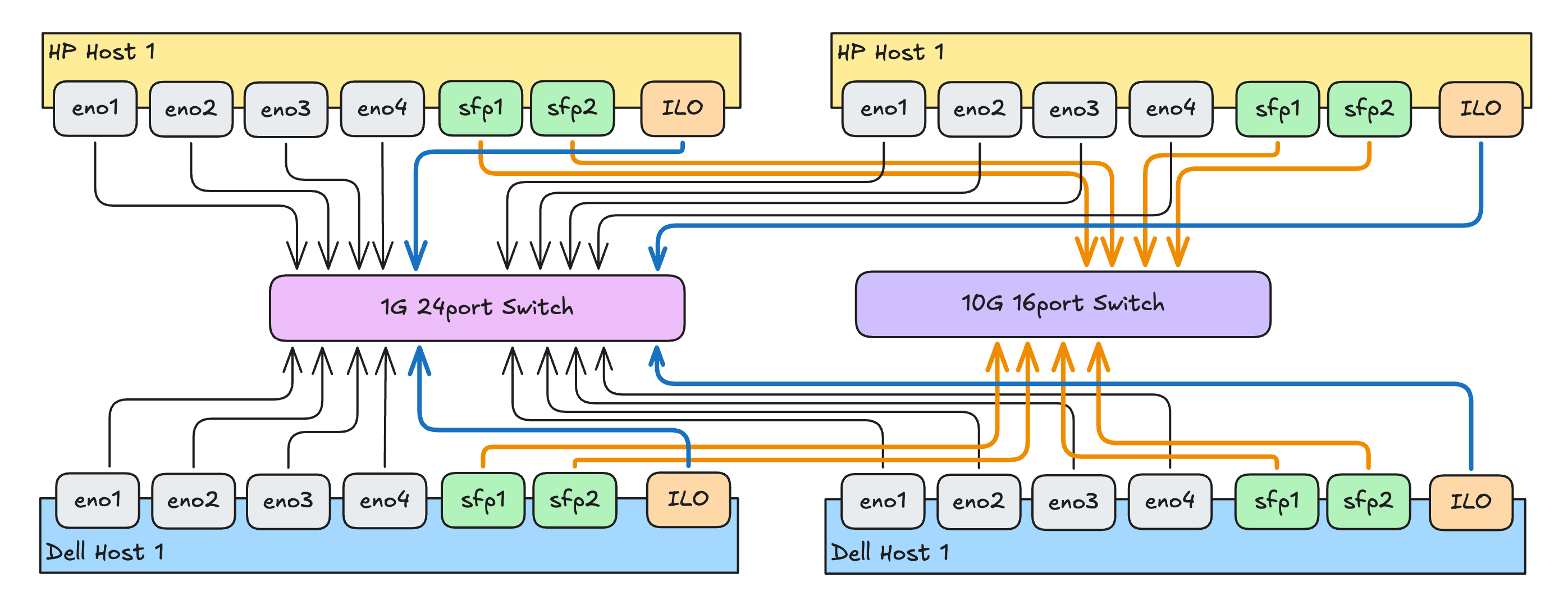
This diagram shows the garage-side physical layout. Each server has four 1G Ethernet ports that will connect to the 24-port 1G switch, and I plan to add a dual-port SFP+ 10G card to each machine so they can connect to a 10G switch.
The uplink from the airing closet will land on the 1G switch. At the moment that link is a 50 m multimode duplex fibre run with a 1G media converter on each end. In future, I would like to remove the media converters and connect the fibre directly to the switches. Because the link is duplex, I could also split it across two switches and use simplex transceivers, which would give me a more redundant uplink. That is a longer-term upgrade, and not one that materially improves day-to-day reliability for a homelab.
The iLO ports, Proxmox management UI, Corosync, and switch management interfaces will live on a dedicated management VLAN. That VLAN will only be reachable through a Netbird peer or via a physical break-glass port on the switches. Ideally, it will have no direct internet access at all.
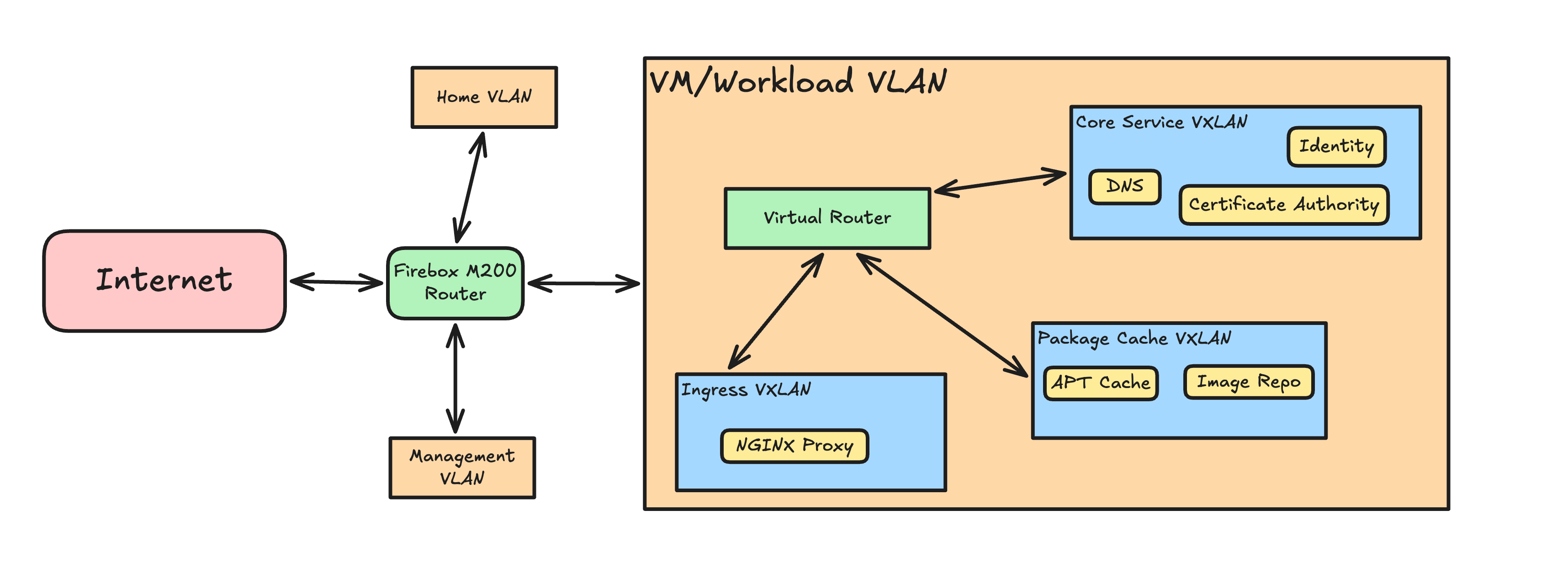
The house will stay on its own Home VLAN. Most of those devices are already on Wi-Fi, and there are only a few IoT devices, so there is little reason to split that network any further for now. If the number of untrusted or guest devices grows, I may add wireless RADIUS-based VLAN assignment later.
The Proxmox VMs will not sit directly on the underlay VLANs. Instead, they will live on VXLANs carried by Proxmox VNets, with a virtual router handling traffic between them. That gives me a cleaner separation between the physical network and the services running on top of it.
The Core Services VXLAN will hold DNS for the homelab, identity services for SSO and machine login, and the certificate authority. These services will have strict firewall rules and very limited outbound access.
The Package Cache VXLAN is separate from Core Services because it will need much broader internet access. In practice, it will probably be reachable from most other VXLANs, since it will be used for package installs and general updates.
The Ingress VXLAN will contain the reverse proxy for internet-facing applications, as well as any self-hosted services that I want to reach remotely without using a VPN. Firewall rules will limit access to the services that should be publicly available, plus any narrowly required access to Core Services.
The diagram below shows the overall VLAN and VXLAN layout for the home network and the homelab.
Storage
As previously mentioned, storage in my old homelab was disorganised and mismatched. Data ended up spread across machines without much structure, which made management and recovery harder than it needed to be. With the new hosts, I want matching storage across the cluster and shared storage that lets VMs move between machines cleanly. To do that, I will use Ceph, which integrates directly with Proxmox.
Initially, Ceph will only store data on the two new HP hosts. That gives me shared storage quickly, but it is still a temporary starting point rather than the final resilient layout. The older Dell hosts will still play a part in the Ceph quorum as monitor nodes, but they will not store any data. With two replicas, that first stage gives me 4TB of usable storage from 8TB raw storage.
That arrangement is only the first phase. Later on, once the storage layout has been expanded with more appropriate hardware, I can increase both resilience and capacity without changing the basic design.
I am comfortable running with degraded placement groups when needed during that transitional phase, since I plan to back everything up regularly and address hardware failures quickly. Later on, I will add a higher-capacity storage appliance for larger datasets, and that will give me more room to increase Ceph replication if I decide to do so.
When the four hosts are online, the high-bandwidth network should also be in place, which will make recovery and data distribution much quicker over 10G links. The separate storage appliance will also be wired into the 10G network, possibly with two ports in link aggregation to provide a 20G aggregate uplink since it will serve multiple clients.
The large storage appliance I plan to add in the future will probably be in the region of 50TB. I will run it on a single machine, since critical services will not depend on it and replication would be costly and not especially beneficial. It will probably run ZFS, with no hardware RAID in front of it, and have some level of SSD cache for frequently accessed files. This is unfortunately hindered by the current hard drive prices, hopefully they will come down soon.
Backups
Onsite backups will be handled by an old workstation PC that I already have. It will run Proxmox Backup Server on bare metal with four disks in a redundant configuration that tolerates a single disk failure. It will take regular snapshots of the VMs and sync them to an S3-compatible cloud provider offsite. In the event of a full data loss from the lab, I should be able to restore everything using the backups and the IaC files.
For frequency, I plan to take hourly backups onsite and sync them offsite daily. I will keep one day of hourly backups onsite, one week of daily backups onsite, and one week of daily backups offsite. That should give me fast recovery for recent mistakes while still keeping an offsite copy for larger failures.
Next up
The IaC side hasn’t been mentioned much in this post as it mainly covered the physical and virtual architecture. I plan to do a post soon on how the IaC is organised in a repo and how the Ansible automations are run on machines when they are isolated in different networks without exposing them everywhere.